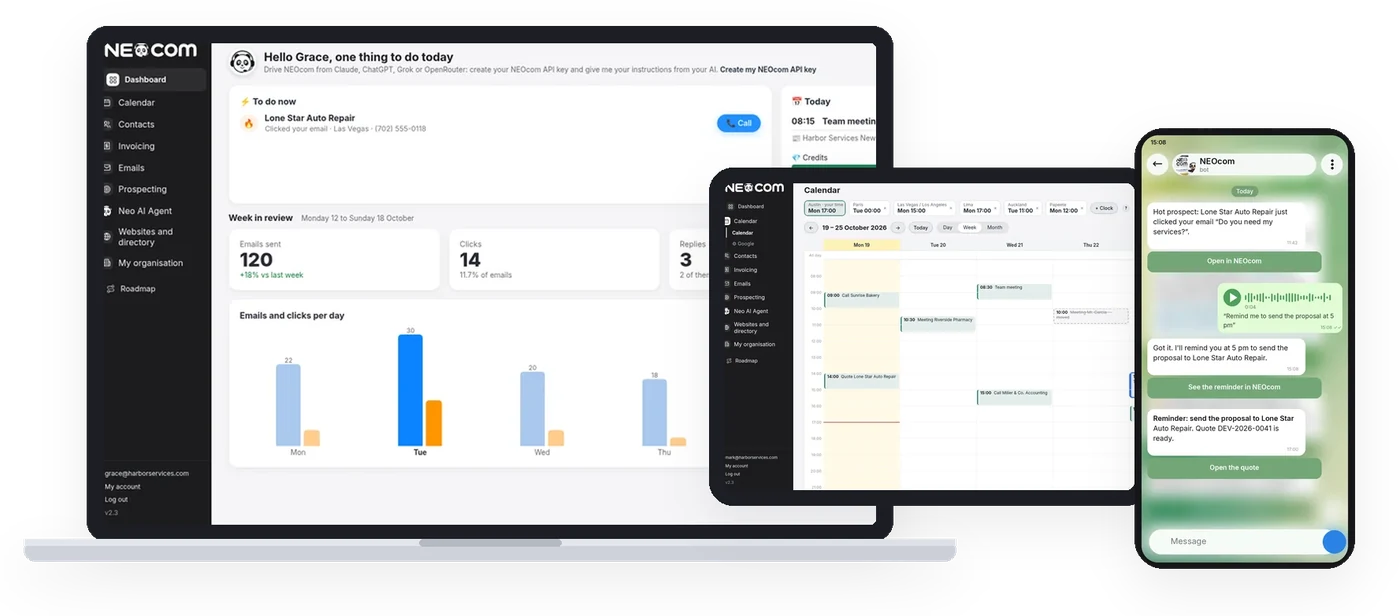
Run your business from anywhere: computer, tablet and phone
NEOcom works on computer, tablet and phone: calendar, emails, contacts, campaigns, quotes and invoices follow you everywhere. And with Telegram, you talk to Neo like a colleague, by text or voice message, wherever you are.
What you can ask Neo on the go, with Telegram
Neo always asks for your confirmation before changing or sending anything.
Area
You tell Neo
Calendar and tasks
Create an appointment tomorrow at 10 with Dupont
Create a task: call the supplier on Friday
Move my Thursday appointment to Friday at 2 pm
Cancel the 3 pm appointment
Fix the title of the task…
Mark the task as done / delete the task
What do I have tomorrow? This week?
Remind me in 2 hours to…
Find me a free slot this week for a one-hour appointment
Contacts, records and notes
Add a note to the Lefèvre Bakery record (company or individual)
Set Dupont as a customer / followed up / not answering
How many contacts do I have in my region? How many with an email? How many contacted?
Give me the phone number, website and opening hours of a company
Give me the phone, email or address of… and show me the record of…
Create company X in my city, or create the individual…
Add this contact: photo of a business card
Who hasn't been contacted for more than 30 days?
Link this contact to category X / mark X as do not contact
Emails received and sent
Show me the emails received this week, the urgent ones, this month's refusals
Mark Dupont's email as handled
Summarise my conversation with X
Prepare a reply to X's email: Neo writes, you approve, the email goes out
Write an email to X offering…
Translate this email for me
Prospecting and Neo's proposals
Approve / reject Neo's proposal for X
Give me ideas to find customers
Which of Neo's proposals are waiting for my approval?
Start a prospect search: restaurants in my city, or email scraping for an area, with the credit estimate before confirmation
How is my search going? How many new prospects found?
Who clicked my email? Today's hot contacts
Email campaigns
Prepare and schedule an email to the restaurants of my city for Tuesday 9 am (draft to approve, nothing is sent without your approval)
Prepare a newsletter for my customers: Neo suggests the subject and text, you correct, you approve
How did my last campaign go? (sent, opened, clicked, replies)
Pause my campaign / cancel Tuesday's campaign
How many emails do I have left this month?
Reports and figures
Free questions about your figures: contacts, emails sent, calendar…
Give me a weekly or monthly report: emails, replies, hot contacts, appointments, tasks, quotes, invoices, credits
Report on my prospecting in Las Vegas
Compare this month with last month
Evening report sent automatically at the chosen time
Quotes, invoices and expenses
Create a quote for X: 3 hours of consulting at $90
Which invoices are unpaid? How much do I have to collect this month?
Mark invoice 2026-012 as paid
Send the quote to X by email
Photo of a receipt: add this expense
Posts and social networks
Post on LinkedIn: … / prepare a post about our new offer (writing, approval, immediate or scheduled publication)
What is scheduled this week? (posts and email campaigns)
Account, team and subscription
How do I…? Help on NEOcom, its features and plans
Report a bug / suggest a feature
How many credits do I have left? What is my plan?
Invite a colleague: first name, email (super admin)
Create my signature, who has which signature?
Documents and Neo's knowledge
Send a PDF or Word file in the conversation: add it to Neo's knowledge
What does Neo know about my company?
Alerts Neo sends you on its own
A prospect replies, a hot contact, an appointment within the hour, today's task is late
A campaign paused or finished, a prospect search finished, credits at zero
Choose the alerts you receive (everything, only replies, only hot contacts…)
Morning summary: today's calendar and tasks, replies to handle
New prospect reply: message preview with Reply / Mark handled buttons
How to connect your Telegram
In NEOcom, open My account then Telegram, and tap “Connect my Telegram”.
Telegram opens the conversation with Neo: tap “Start”.
Write to Neo or send a voice message. That's it.
Always under your control
Neo asks for your confirmation before any action that changes or sends something.
Neo respects your role's rights: it only does what you can do in NEOcom.
Deleting a record or an account, paying or changing plan stays in the app, never through Telegram.
Try Neo, at the office or on the go
Create your account, connect Telegram in two minutes and command your agent from anywhere.